Sharing a Cook to The Potluck
When you've dialed in a cook worth showing off, share it to The Potluck so other pitmasters can see it, fire it, and cook it themselves.
How to Share
Open any cook from your Cooks tab and tap the share icon in the top right. You can also share right after finishing and rating a cook.
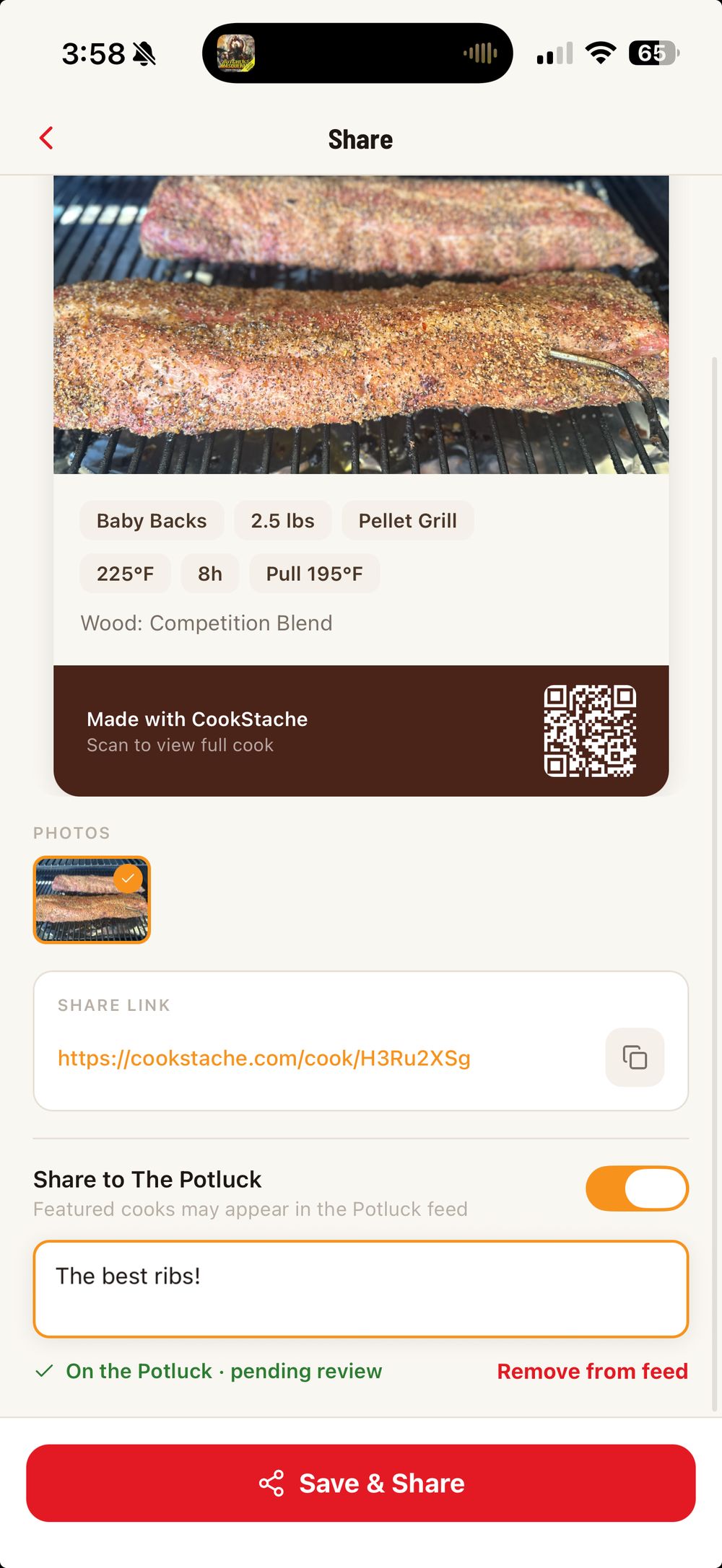
Sharing creates a public version of your cook with its own link. You can send that link to anyone — it opens in the app if they have CookStache installed, or in the browser if they don't.
What Becomes Public
When you share a cook, the content you chose to share becomes publicly visible: the cook's name, photos, ingredients, temps, times, method, and your chef display name. Your private notes and your stache stay private — sharing a cook never exposes your inventory or anything you didn't put in the cook itself.
Before your photos go public, they're automatically screened for inappropriate content. This usually takes just a moment and you won't notice it — it's there to keep the feed clean for everyone.
Bring Your Real Cooks
The Potluck runs on authenticity. Share what you actually cooked — real photos, real temps, real results. Only post cooks and photos that are yours or that you have permission to share, and give credit if your cook was inspired by someone else's. The full expectations are in our Community Guidelines at cookstache.com/guidelines.
Unsharing a Cook
Changed your mind? You can unshare a cook at any time from the cook's page. Unsharing takes the public page down — the link stops working and the cook leaves the feed. Your original cook stays safe in your own Cooks tab; unsharing only removes the public copy.
Was this helpful?
Still need help?
Email us at hello@cookstache.com