Sharing Your Cooks
When you nail a cook, share it. CookStache creates a shareable web page with your photos, recipe details, and a link that anyone can open — no app required. Send it via text, email, social media, or anywhere you can paste a link.
How to Share a Cook
Open any cook from your Cooks list.
Tap the share icon in the top right.
Your share link is automatically generated.
Select which photos to include (tap to toggle them on or off).
Tap "Save & Share" to open your phone's share sheet.
Send via text, email, AirDrop, or any app.
The Share Card
The Share screen builds a visual preview card from your cook data. It includes the cook title, hero photo, and all the key details as tag chips — protein, equipment, pit temperature, cook time, pull temperature, and wood type.
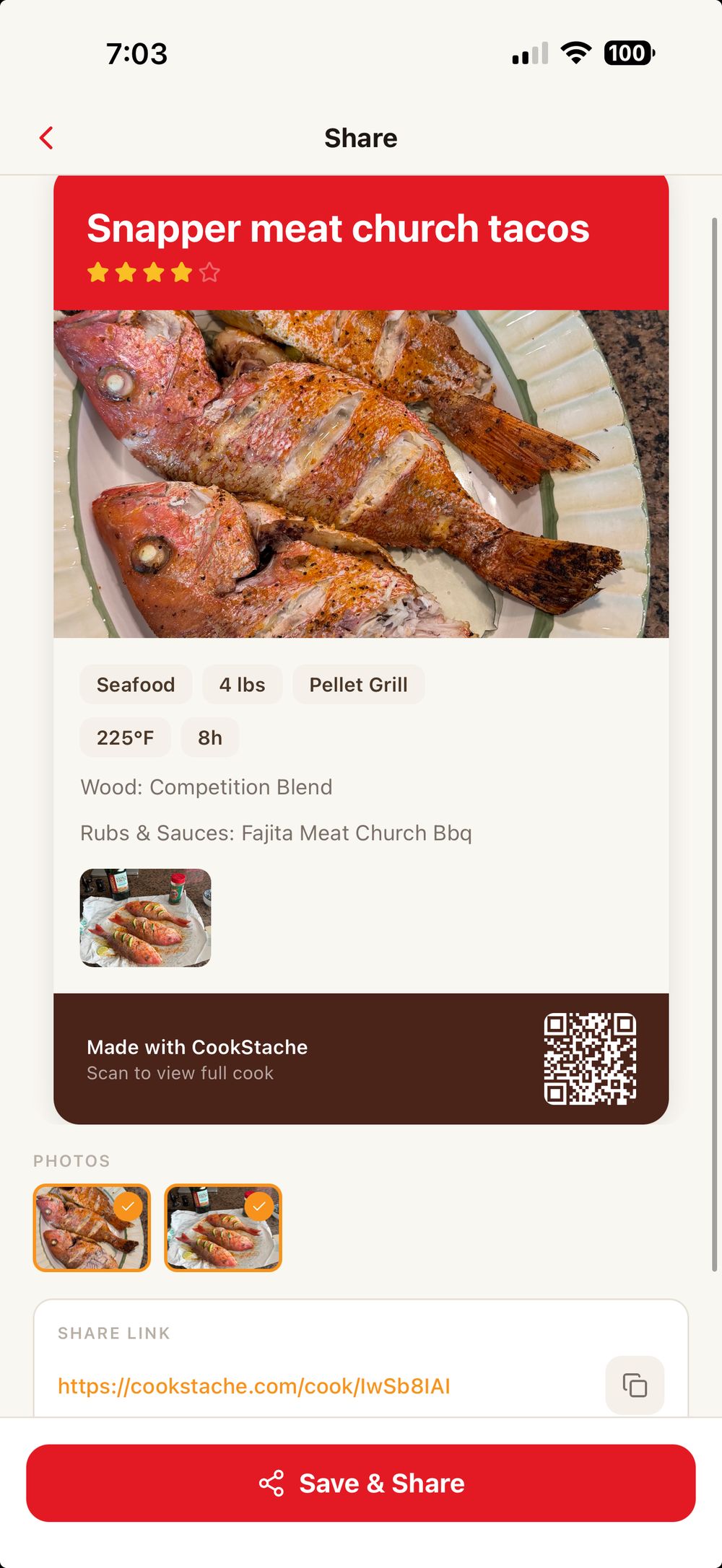
Below the card you will see your Photos section where you can select which images to include. Tap a photo to toggle it — selected photos show an orange checkmark.
The Share Link section shows your unique URL (like cookstache.com/cook/b47OgDWV). Tap the copy icon to copy it to your clipboard, or tap the link itself to preview the page in your browser.
Share to Community
Scroll down to find the "Share to CookStache Community" toggle. Turn this on to submit your cook for the community feed where other CookStache users can discover it.
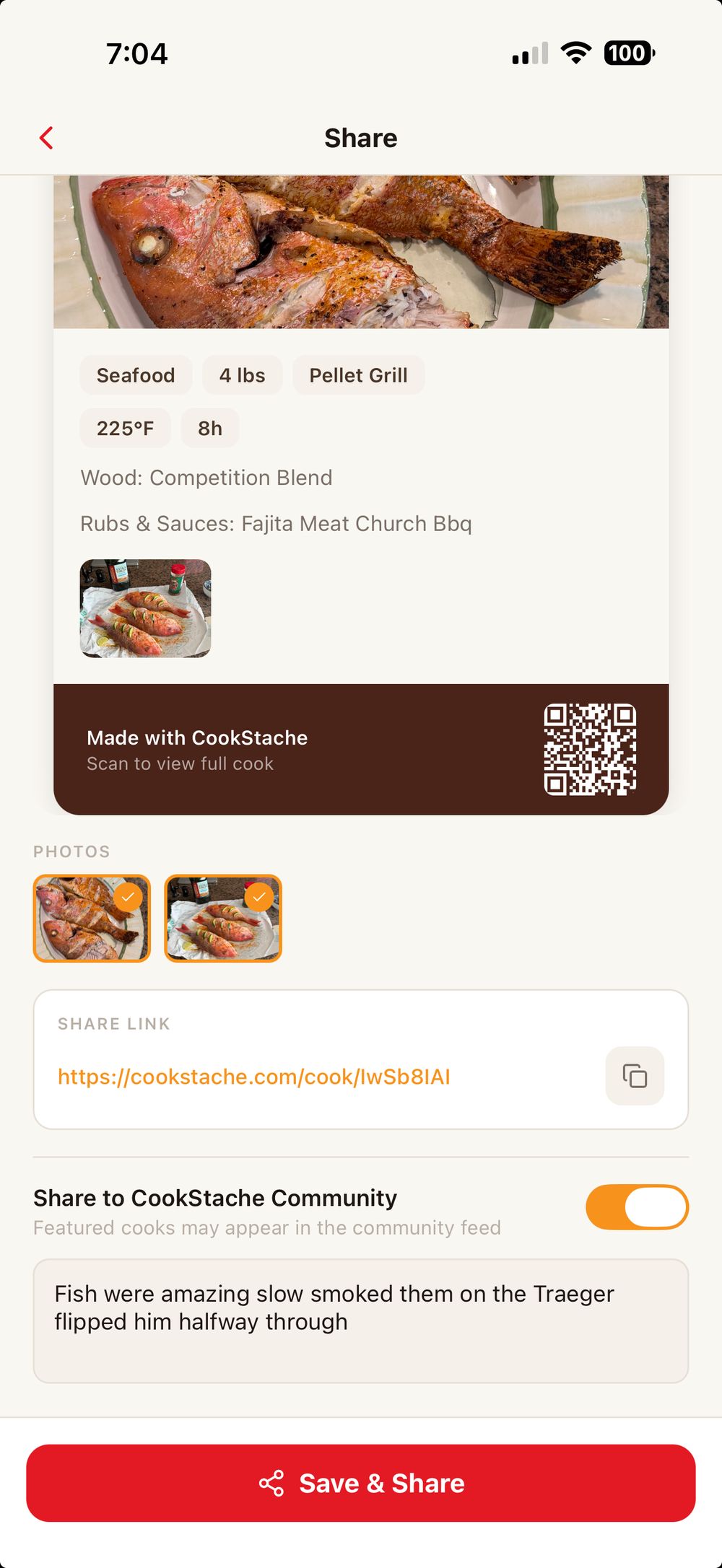
When you toggle this on, add a short note about why the cook is great. Your cook will be reviewed and may be featured in the community feed.
Tap the red "Save & Share" button at the bottom to save your share settings and open your phone's share sheet so you can send the link however you like.
QR Code
The QR code on the preview card links directly to your shared cook page. Tap it to enlarge. This is great for showing someone at a cookout — they can scan it with their phone camera and pull up the full cook instantly.
What the Shared Page Shows
When someone opens your shared link, they see a clean web page at cookstache.com with everything about your cook:
Cook title, your name, and the date you cooked it.
A hero photo with the cook details displayed as summary chips — protein, weight, heat source, pit temp, cook time, pull temp, wood type, and servings.
Source attribution if the recipe was imported from a website, scanned from a cookbook, or generated by AI.
Cook stages if you ran a multi-stage cook (like a smoke stage followed by a wrap stage).
Pull temperature with a helpful hint explaining why that temp was chosen.
Rubs and sauces you used, with links so the viewer can find the same products.
The full recipe with ingredients and step-by-step instructions (if the cook has a method attached).
All the photos you selected when sharing.
An "Open in CookStache" button for people who have the app, or a "Get CookStache free" link for those who do not.
Copying the Link
Tap the copy icon next to the share link to copy it to your clipboard. You can paste it into any message, email, or social post. The link generates a rich preview with your cook photo when shared on social media or in iMessage.
Share Stats
Once you have shared a cook, you will see view, save, and reshare counts on the cook detail screen below the title. This shows how many people viewed your shared page, saved it to their own CookStache, or reshared it.
Saving Someone Else's Shared Cook
When you receive a shared cook link from someone else:
Open it in your browser to see the full cook details — no account needed.
If you have CookStache installed, tap "Open in CookStache" to view it in the app.
Tap "Save Cook + Recipe" to add the cook and its full recipe method to your library.
Tap "Save Cook Only" to save just the cook details without the recipe steps.
Photos
Photos are converted to JPEG for compatibility across all devices. Select which photos to include before sharing — the first photo (or your chosen key photo) is used as the link preview image when shared on social media or in messages.
Was this helpful?
Still need help?
Email us at hello@cookstache.com